The problem reaches a manager late
The worker reports it, but the message gets lost among other conversations.
For manufacturing teams working in shifts
Bring worker reports, responsible people and shift records together. Understand recurring interruptions and act while the problem still needs attention.
Workers in Telegram. Managers in one web panel.
See how it works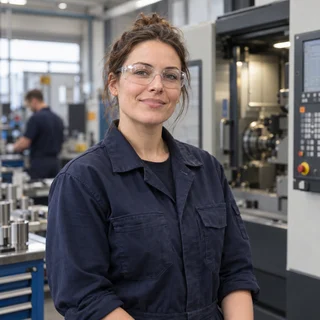


Illustrative portraits of manufacturing professions, generated with AI.
Production at a glance: what needs action now
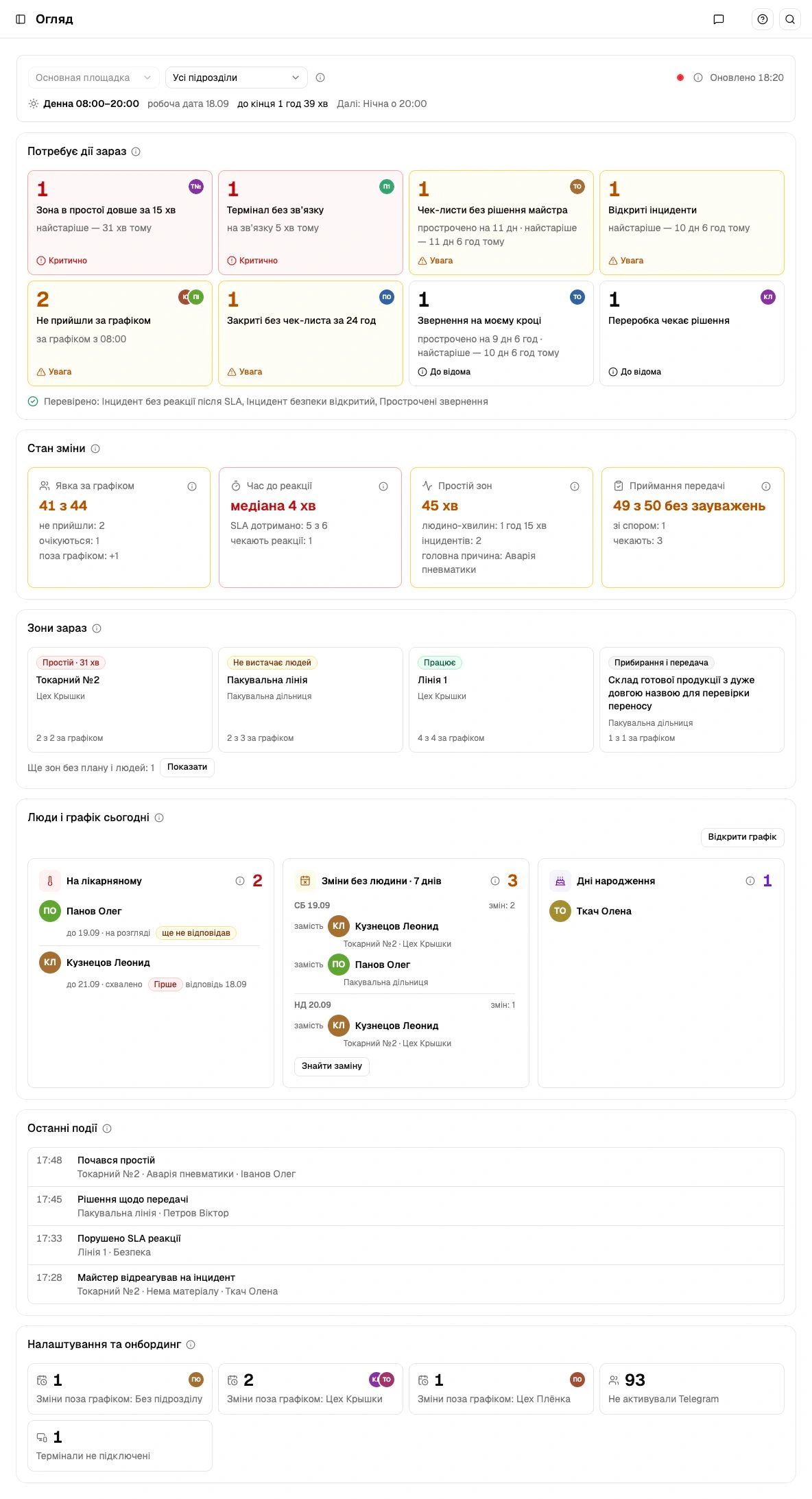 Full screen
 Actual Ukrainian interface. Panel records and illustrations are demo data, not customer results.
Calls, chats and paper logs leave pieces of the same problem in different places. The next shift starts without the full picture.
The worker reports it, but the message gets lost among other conversations.
Teams deal with the interruption without a shared record of when and why it happened.
A missed checklist or unclear handover leaves the next team to discover the problem again.
Prevent avoidable disruption, respond to downtime and improve the next shift. Choose a workflow to see how the interfaces connect.
Kiosk
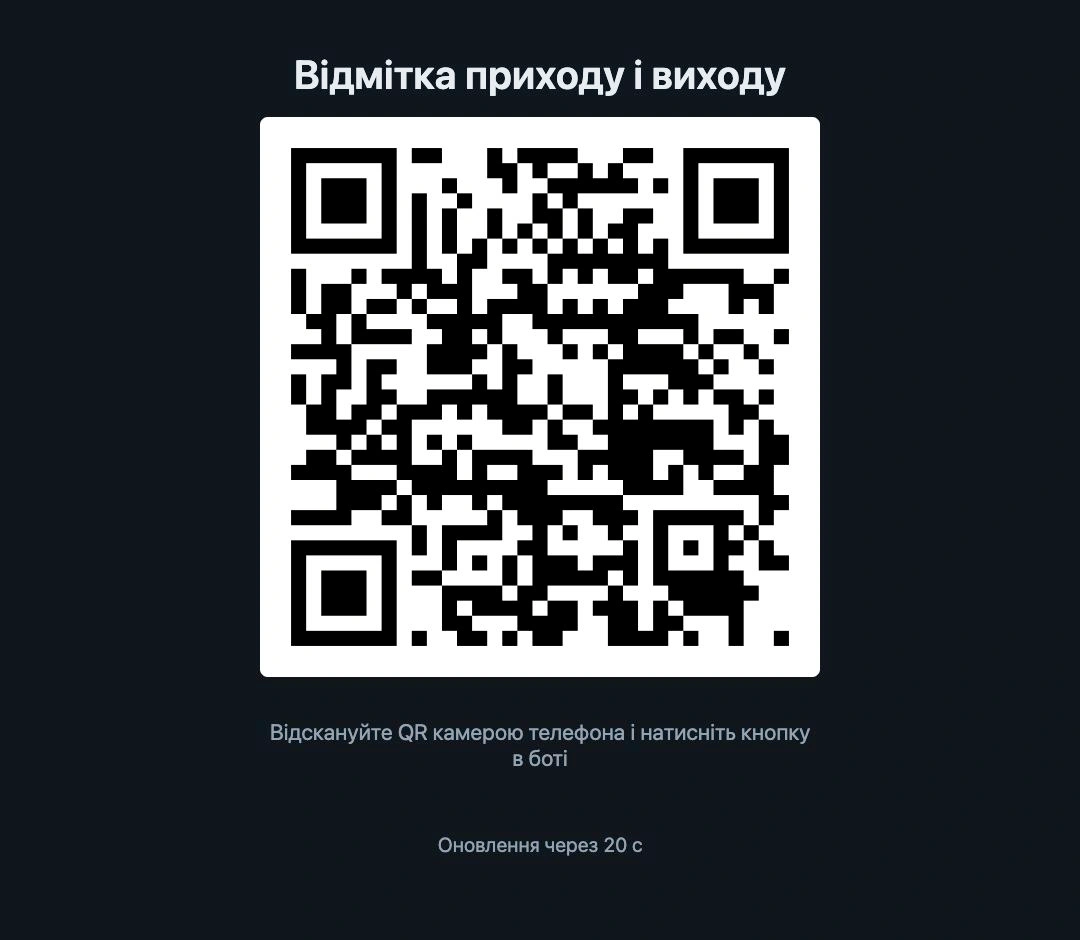 Assigned attendance
Worker’s Telegram
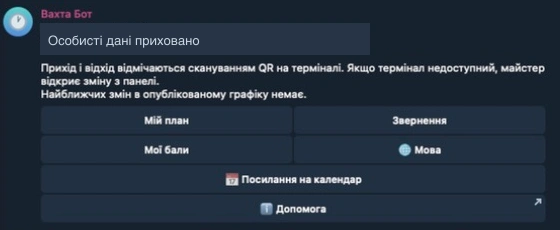 Personal plan and notifications
Master’s panel
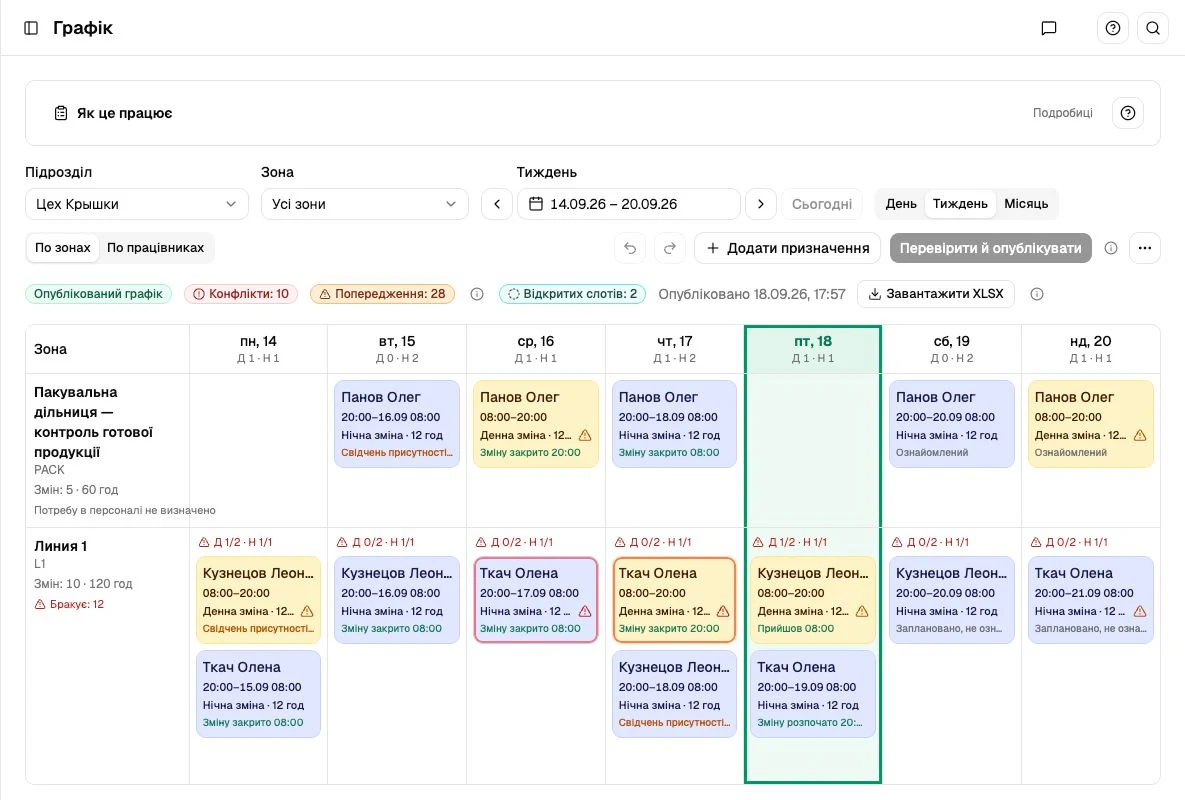 Schedule → review → publish
Planners fill shifts and review conflicts. Workers see the published plan; recorded attendance helps reveal deviations.
Full screen ⛶Kiosk
QR at the entranceWorker’s Telegram
Confirm arrivalMaster’s panel
 Attendance in the shift view
Workers scan the QR and confirm arrival in the bot. The panel shows the recorded attendance.
Full screen ⛶Kiosk
Attendance pointWorker’s Telegram
Reason, details, photoMaster’s panel
 Incident → master’s response
A report from the floor reaches the responsible person. Responses and decisions stay in the record.
Full screen ⛶Kiosk
Exit after reportingWorker’s Telegram
Checklist → photos → reportMaster’s panel
 Review → decision
Workers prepare the zone and report. Masters review the material; the next shift accepts the zone. QR records departure.
Full screen ⛶Kiosk
Recorded arrival and exitWorker’s Telegram
Shift summary and pointsMaster’s panel
 Reports → recurring reasons
Recorded events support time accounting, points and a review of recurring losses.
Full screen ⛶Kiosk
Attendance recordWorker’s Telegram
My pointsMaster’s panel
 Master’s decision → summary
An approved checklist provides the basis for points. Workers see the result; managers see history and totals. Points support consistent standards.
Full screen ⛶Process illustration based on existing capabilities. Controls change only this demonstration.
From scheduling to shift results: explore each capability and inspect the actual interface.
Screens are labelled as demonstrations or authorized real cases. Personal fields are excluded from real-case screenshots.
Scheduling
Plan day and night shifts by zone or employee. See open slots, absences and conflicts before publishing.
Value for manufacturingSpot staffing gaps before they interrupt work.
How it works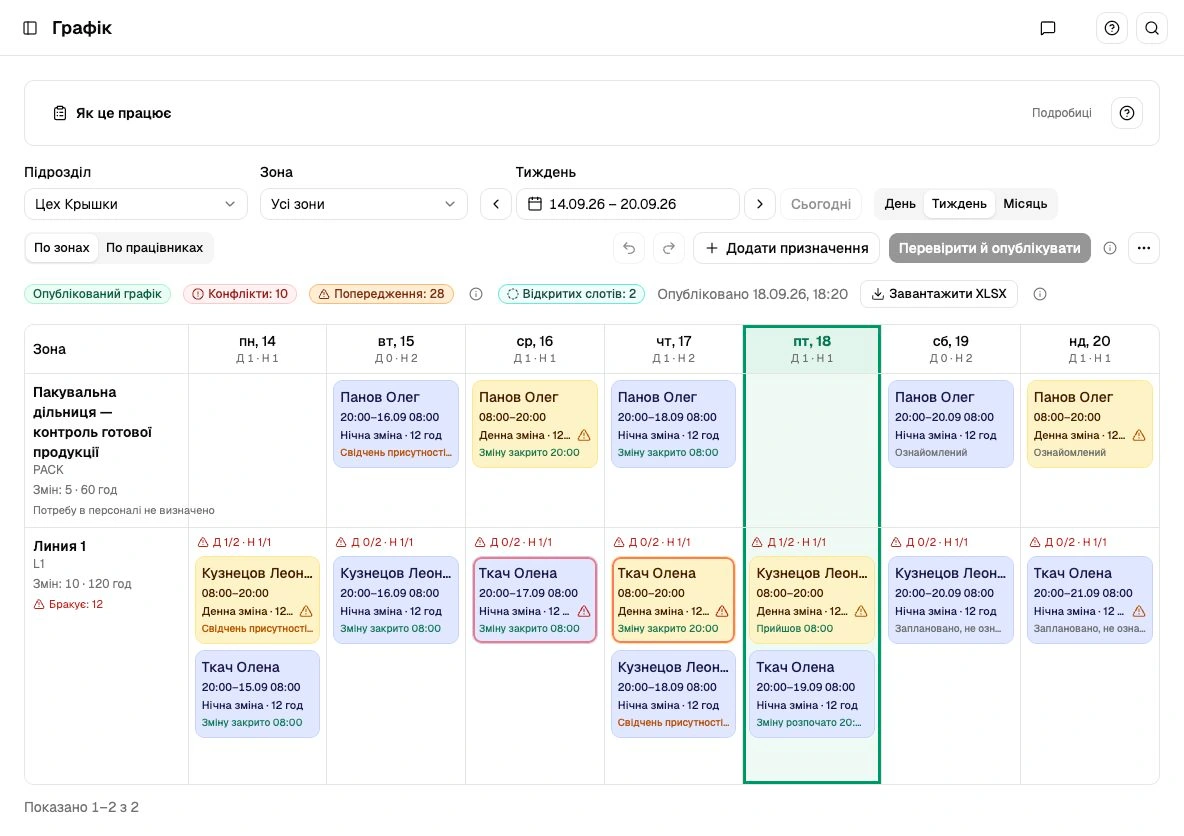 Full screen
 Actual Ukrainian interface. Panel records and illustrations are demo data, not customer results.
Downtime & incidents
Workers report an obstacle in the bot. Masters see its reason, time, status and response history.
Value for manufacturingSee who is responding and what has been done. Recurring reasons stay in the record.
How it worksFull screen Actual recorded case in Vakhta. Personal fields are outside the crop. AI suggestions require a master’s review; this is not evidence of accuracy or downtime reduction.
Cleaning & handover
Finishing work leads to cleaning, a checklist and photos. A master reviews the report; the next worker accepts the zone.
Value for manufacturingKeep the zone’s condition, concerns and decisions together between shifts.
How it worksFull screen Actual recorded case in Vakhta. Personal fields are outside the crop. AI suggestions require a master’s review; this is not evidence of accuracy or downtime reduction.
Reports
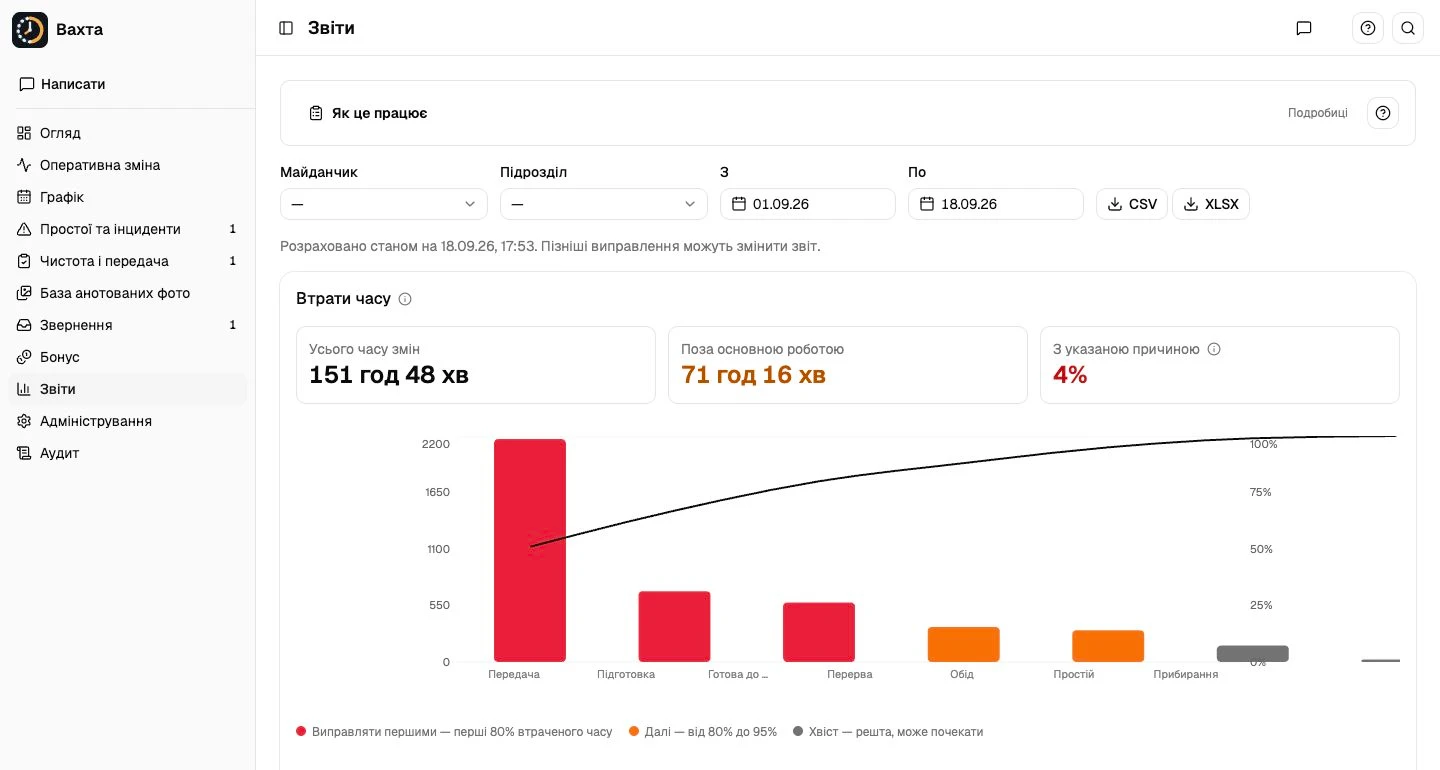
Compare recorded work, breaks and downtime. Explore loss categories and reports for the period you need.
Value for manufacturingChoose the recurring problem to investigate first using records rather than memory.
How it worksFull screen Actual Ukrainian interface. Panel records and illustrations are demo data, not customer results.
Bonus
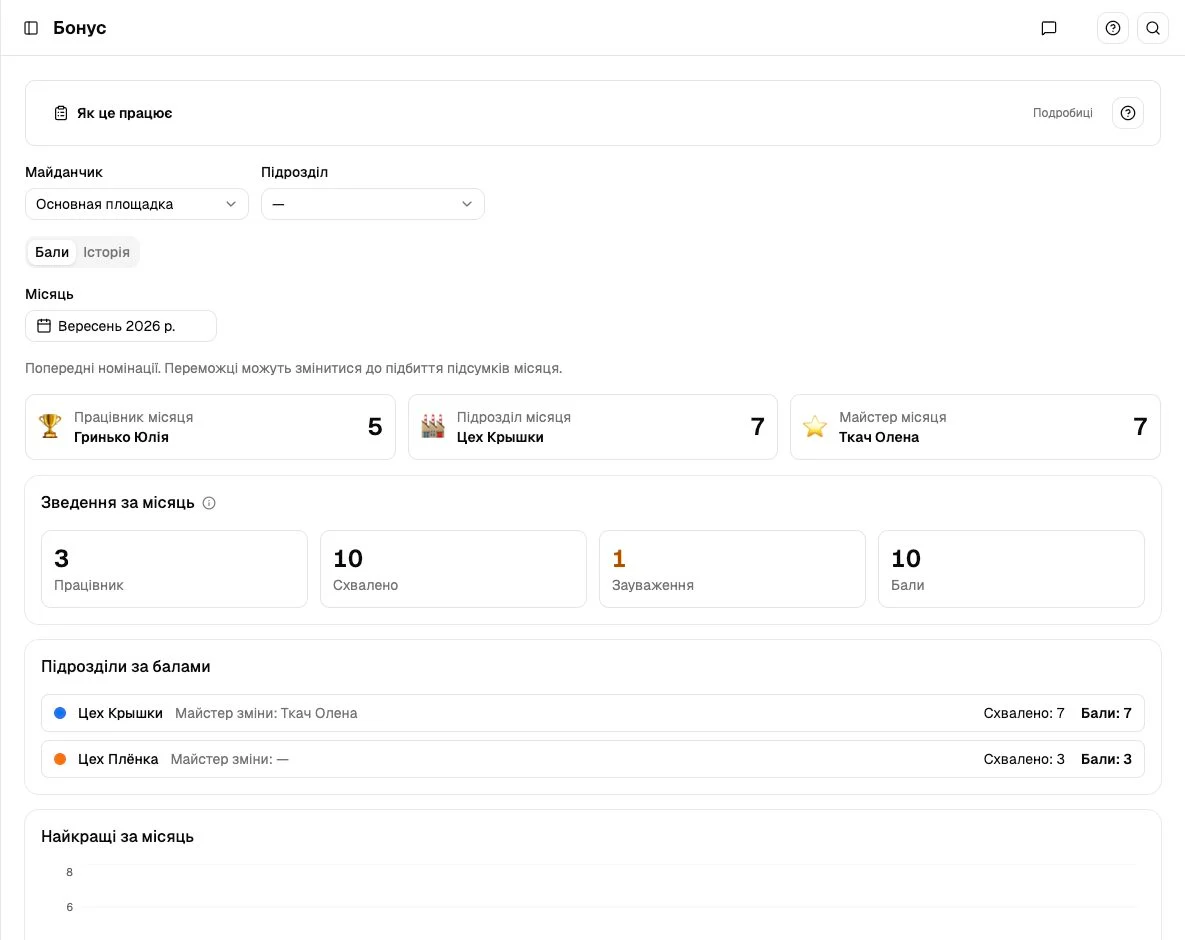
Approved checklists and review comments form a traceable points history. See employees, units and monthly summaries.
Value for manufacturingA clear basis for discussing contributions. Points tracking is not payroll calculation.
How it works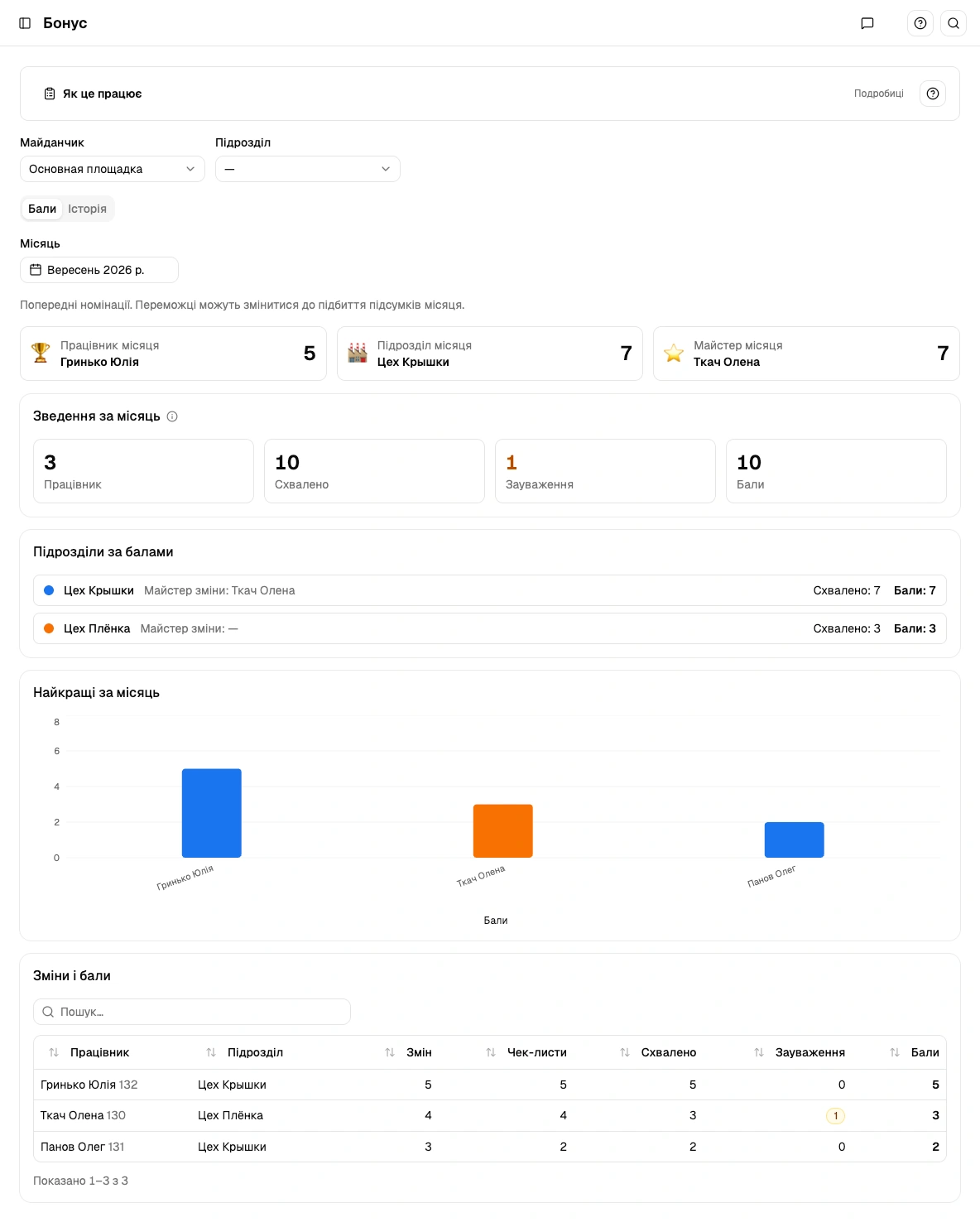 Full screen
 Actual Ukrainian interface. Panel records and illustrations are demo data, not customer results.
Live shift
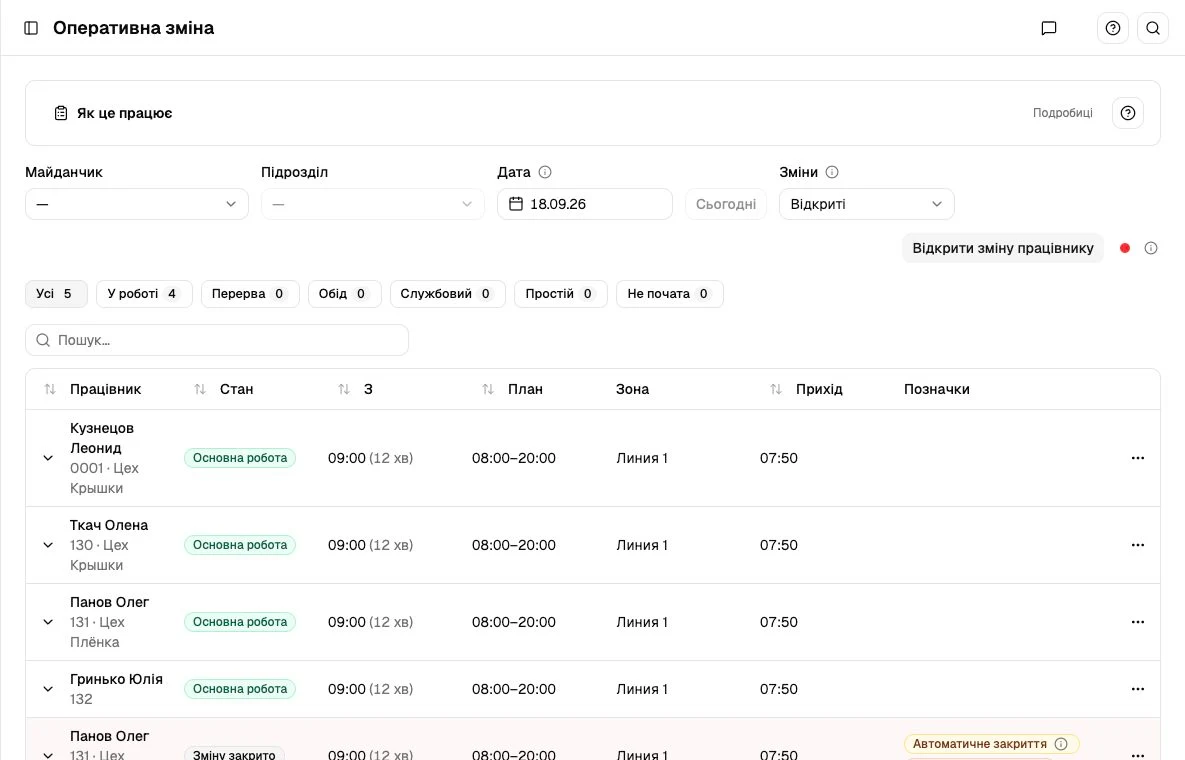
Attendance, zone, plan and current worker status share one operational screen.
Value for manufacturingLess searching through messages, more context for decisions.
How it worksFull screen Actual Ukrainian interface. Panel records and illustrations are demo data, not customer results.
Checklist builder
Define checks for each position: items, required photos and photo rules. Versions preserve the context of earlier reports.
Value for manufacturingTurn written standards into concrete actions.
How it works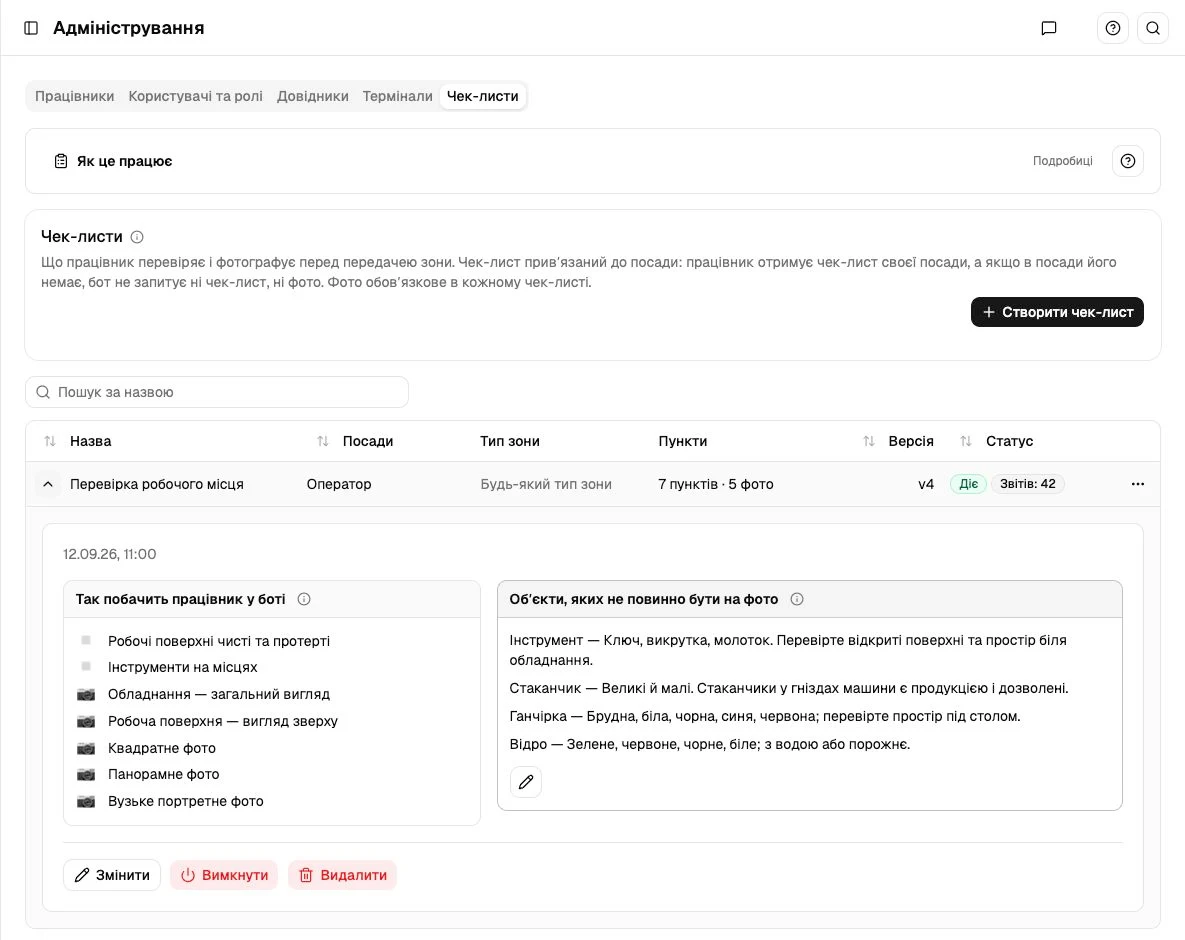 Full screen
 Actual Ukrainian interface. Panel records and illustrations are demo data, not customer results.
Employee requests
Workers submit requests in Telegram. Responsible people review them at their approval stage.
Value for manufacturingKeep approvals out of scattered personal conversations.
How it works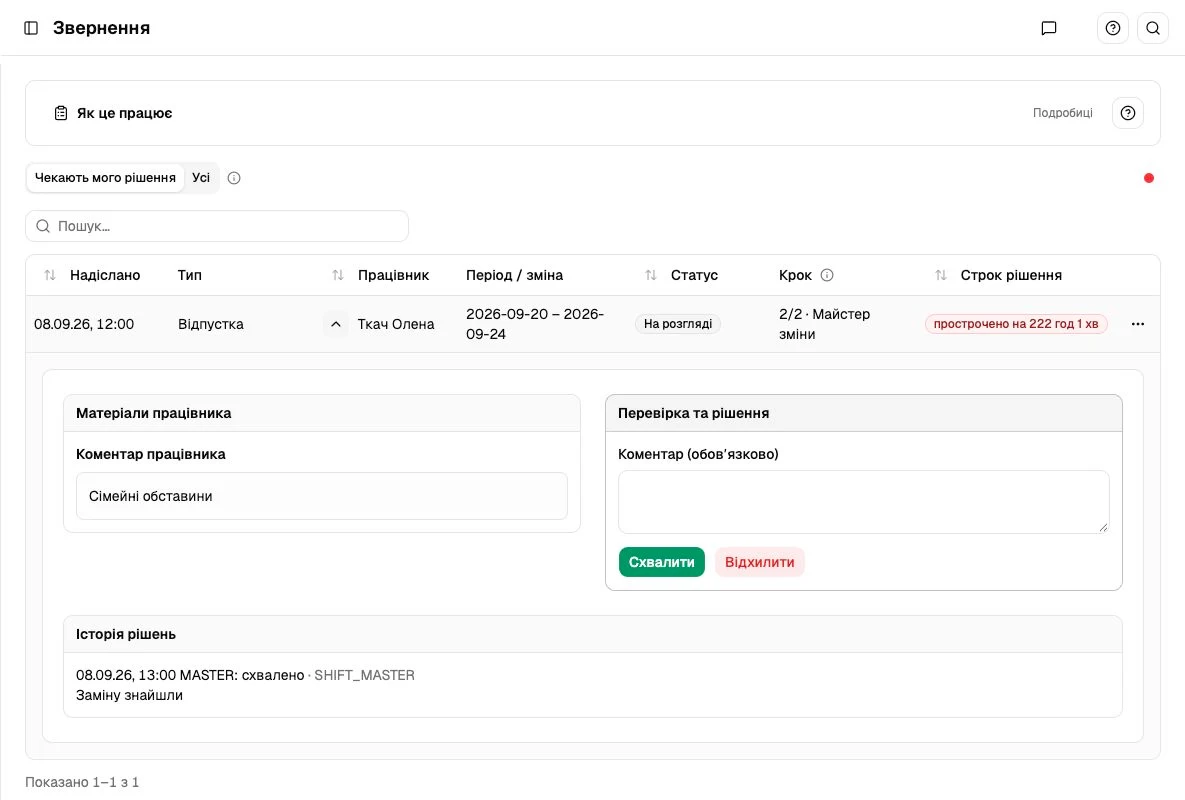 Full screen
 Actual Ukrainian interface. Panel records and illustrations are demo data, not customer results.
Communications
Choose workers in the panel and prepare a Telegram message with attachments or a questionnaire.
Value for manufacturingReach workers through the channel they already use.
How it works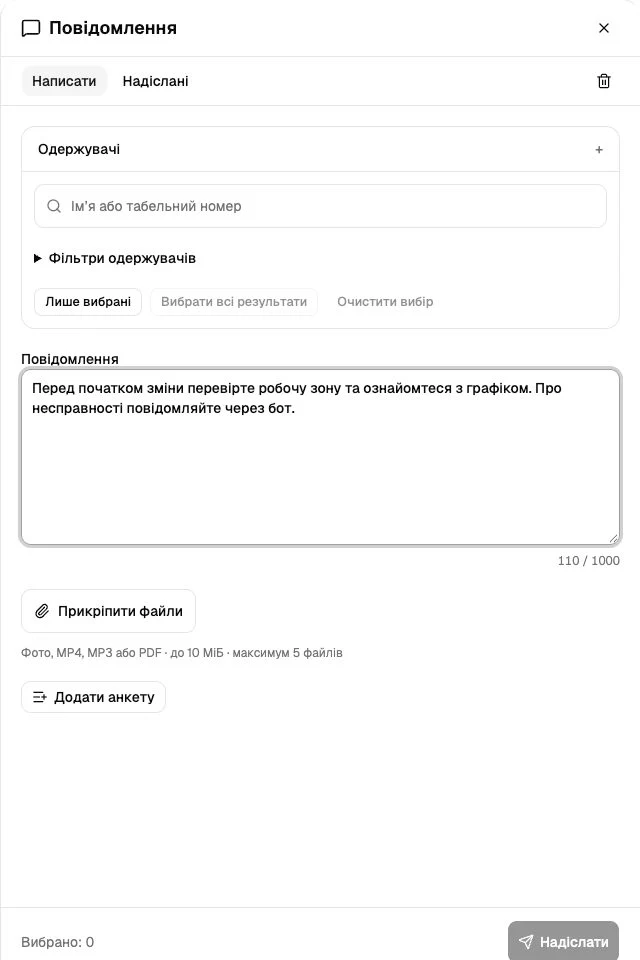 Full screen
 Actual Ukrainian interface. Panel records and illustrations are demo data, not customer results.
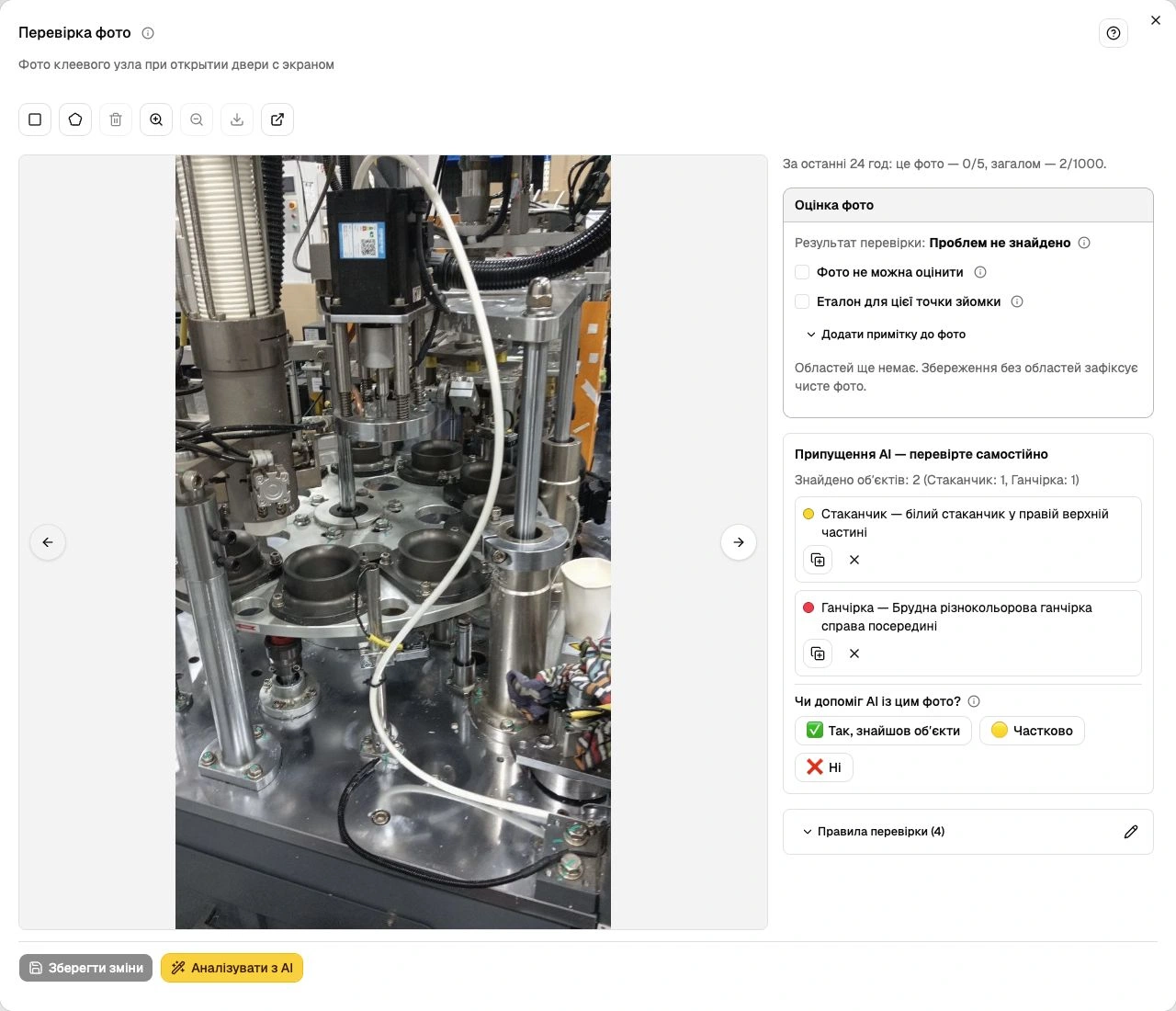
Photo review
Report photos retain review results and annotations. Filters help locate a particular case.
Value for manufacturingShared context for cleanliness reviews. The master remains accountable for the decision.
How it worksFull screen Actual recorded case in Vakhta. Personal fields are outside the crop. AI suggestions require a master’s review; this is not evidence of accuracy or downtime reduction.
People & setup
Employee profiles, positions, roles, terminals and checklists share one administration area.
Value for manufacturingOne structure for schedules, attendance and operational processes.
How it works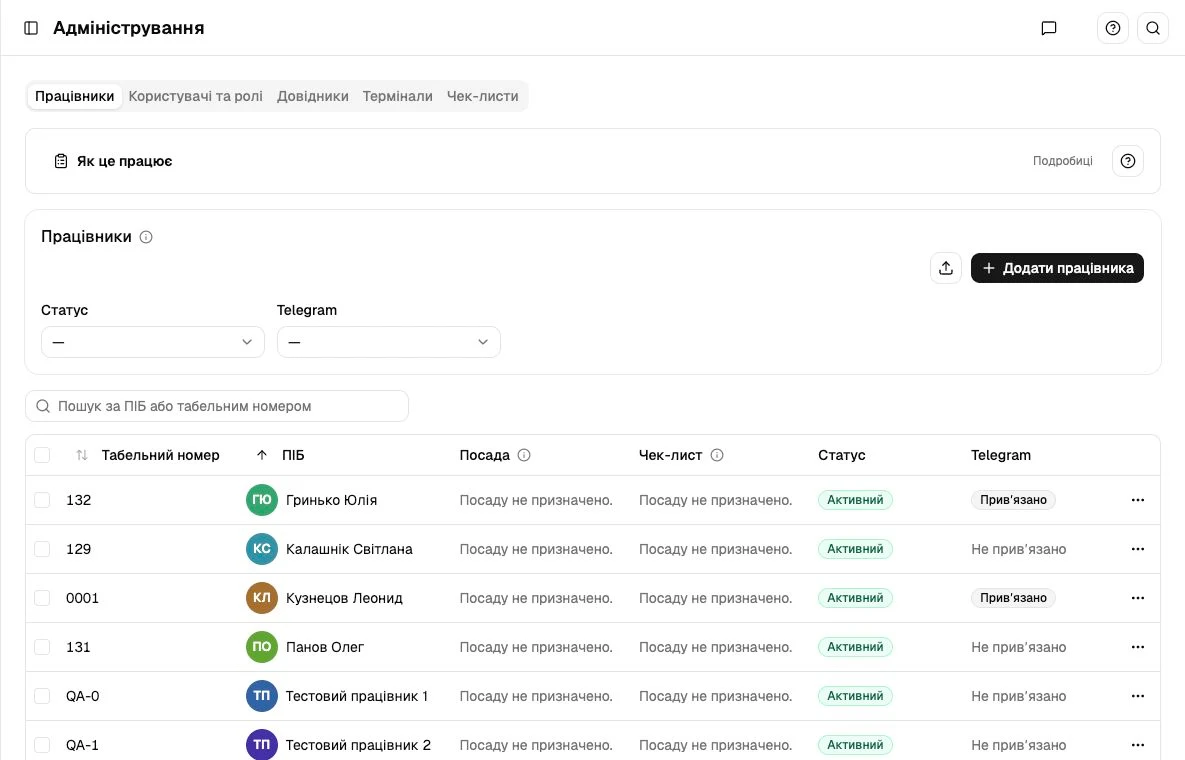 Full screen
 Actual Ukrainian interface. Panel records and illustrations are demo data, not customer results.
Audit
The action log helps reconstruct changes and inspect exactly what changed.
Value for manufacturingTraceability for internal control and resolving disputed events.
How it works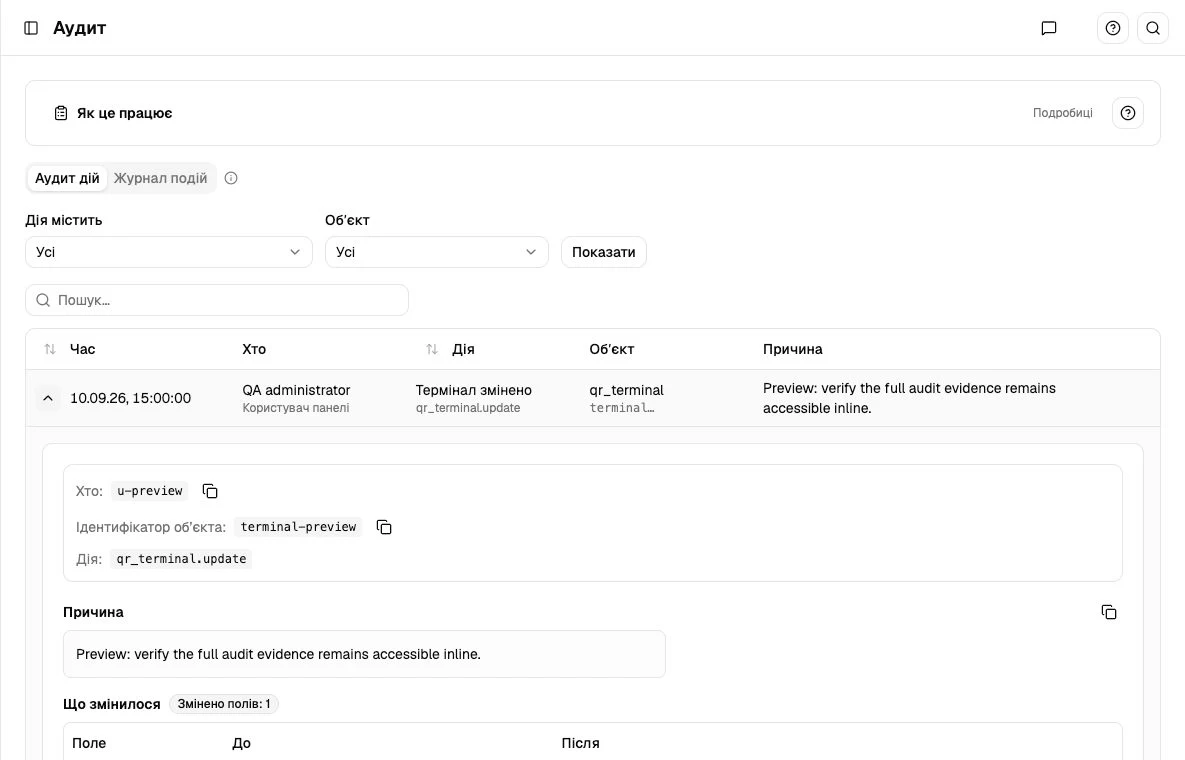 Full screen
 Actual Ukrainian interface. Panel records and illustrations are demo data, not customer results.
Employee activity records are not machine telemetry. They help investigate time loss; they do not measure OEE, line capacity or prove a root cause.
Telegram
Their plan, work actions, requests, checklist and points are in one familiar bot. The image shows its actual menu; the sequence below explains the journey.
Full screen A cropped view of the actual bot in Telegram. Personal details are concealed. Ukrainian interface.
From the person reporting an interruption to the person responsible for production.
See recorded loss patterns and recurring incidents. Choose where to investigate and what a pilot should measure.
See problems needing attention, review evidence and record the response and handover decisions.
Report a problem, complete the assigned checklist and submit or review evidence in the relevant workflow.
Start with a recent interruption at your production site. Walk through the matching scenario together.
Screens are labelled as demonstrations or authorized real cases. Personal fields are excluded from real-case screenshots.
A focused pilot starts with your recurring problem and a person responsible for the test.
Agree on one production process, participating shifts and a pilot owner.
Agree how to compare response time, recurring incident reasons and checklist completeness.
Discuss what changed, what did not and whether the value justifies the next step.
Scope, timing and commercial terms are agreed together. Downtime reduction is a goal to test, not a promised percentage.
Discuss a pilotRecorded facts help a manager investigate a problem without turning an incomplete record into a conclusion.
We are testing demand for connected frontline operations in manufacturing. Discuss the product, evidence and next milestones with us.
It combines prevention and response: schedules expose staffing gaps, checklists define preparation standards, handovers preserve zone condition, notifications bring in the responsible person, and reports reveal recurring reasons. Results depend on team action and are evaluated in a pilot.
Shift-based production where attendance, work-zone readiness, a master’s response and handover matter. A pilot can focus on one unit, zone and specific process.
The kiosk displays a QR for arrival and departure. Workers confirm actions and manage their shift in Telegram. Masters use the same records in the web panel for attendance, incidents, reports and decisions.
View a personal schedule, accept a zone, start work, record permitted breaks or downtime with a reason, report a problem, complete photo checklists, submit requests and view points. Available actions depend on the shift state.
No. It starts the closing process: cleaning, a checklist and a report when required for the position. Normal closure follows the report through the exit QR. Permitted master actions with a comment and rule-based automatic closure also exist.
Assignments by zone, day and night shifts, open slots, absences, conflict review, publishing, personal plans in Telegram and XLSX export. These help reveal coverage issues before the shift starts.
A worker reports it through the bot and the responsible person is notified. The panel shows the state, reason and response history. Configured reminders and escalation rules apply to overdue responses.
Workers prepare the zone, complete their position’s checklist and add required photos. A master reviews the material and approves or records a concern. The next shift sees the handover and records zone acceptance.
Yes. Administrators define items, required photos and review rules, then link a checklist to a position. Versions preserve the requirements used for earlier reports.
Photo-review results assist review. The master remains responsible for the report decision and observations. We do not promise infallible automated cleanliness detection.
Recorded work and other time states, attendance, loss categories, incidents and related records for the selected period. They support reviews of recurring reasons. Worker records are not automatic equipment telemetry.
Bonus tracks points, their recorded basis, history and monthly totals under product rules. Salary calculation, payments and taxes are outside this capability.
Workers submit requests such as leave or corrections in Telegram. Responsible people review them through approval stages in the panel, recording decisions and comments with history.
Yes. Select recipients, prepare text, add supported attachments or a questionnaire, and send through Telegram. Sent messages can be reviewed.
Access depends on assigned roles and responsibility scope. Administration manages people, roles and terminals; audit records help inspect changes. We will review permissions for your structure during the demo.
The kiosk is a web page on a prepared browser-equipped screen; workers use Telegram and managers use a browser. Device compatibility is checked before a pilot. Machine connections, ERP/MES integrations and automatic OEE are not advertised as ready capabilities.
Telegram, current QR codes and communication with the panel require connectivity. We do not promise a full offline mode. A fallback workflow and permitted master actions are agreed for the pilot.
Yes. They show current Vakhta interfaces. Panel overviews use demo records. An actual incident and handover review with equipment photos are also shown, with personal fields outside the crop. Telegram is the actual bot with personal details concealed. The kiosk QR is historical and no longer usable for attendance. Profession portraits were generated with AI.
Select a process and zone, record the baseline and agree success criteria. Review record completeness, response time, recurring incidents and handovers. No downtime-reduction percentage is promised in advance.
Choose “Discuss a pilot” or “Request a demo” to open an email with a recipient and subject. Include your manufacturing type, shift count and main problem. Scope, timing, price and responsibilities are agreed separately.
Tell us about your process, a recurring problem and your role. We will have a concrete starting point for a demo or pilot discussion.
Choose the conversation you want to start.
Download the team overview (.txt)The button opens your email app with the recipient and subject filled in. You choose when to send the message.